
Sign in through our admin area. If you do not have a login to the admin area, please talk to the manager of your department.
1: From the Admin login choose the Offices tab

2: Click the "Create New Main Office" button
3: Enter Company information and Create.
A modal will pop up in the middle of your screen asking for the Company Name, Office Code (Unique ID that will be used in their referral link and office admin link), and the type of agreement they are on.
-If they are on a Referral agreement it will ask for a Referral Amount, which will be displayed as a percentage.
-If they are on Membership, a service discount % of 5 or greater must be entered
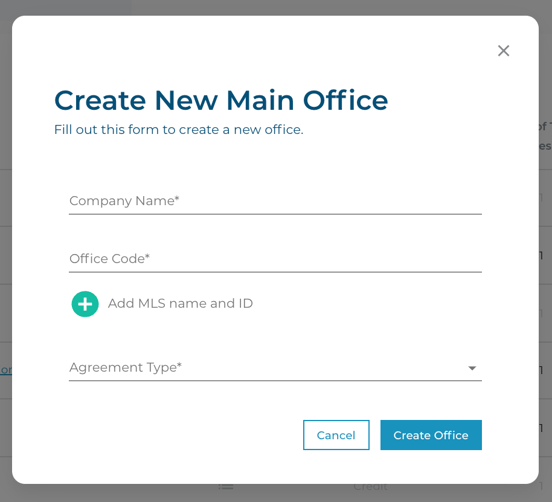
4. MLS Name and ID
Click the green circle plus, and choose an MLS name from the drop-down menu. If one is not available, then this option does not apply. You can add multiple MLS Names by clicking the green circle plus again.
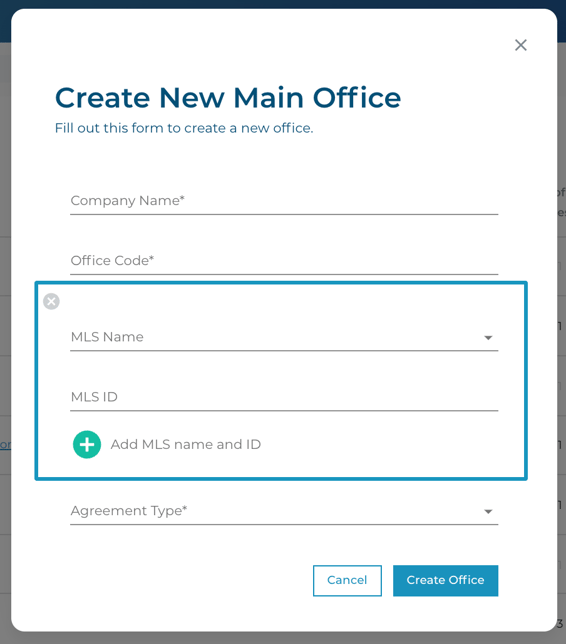
After choosing 'Create Office', the Office will appear on the "All Offices" list